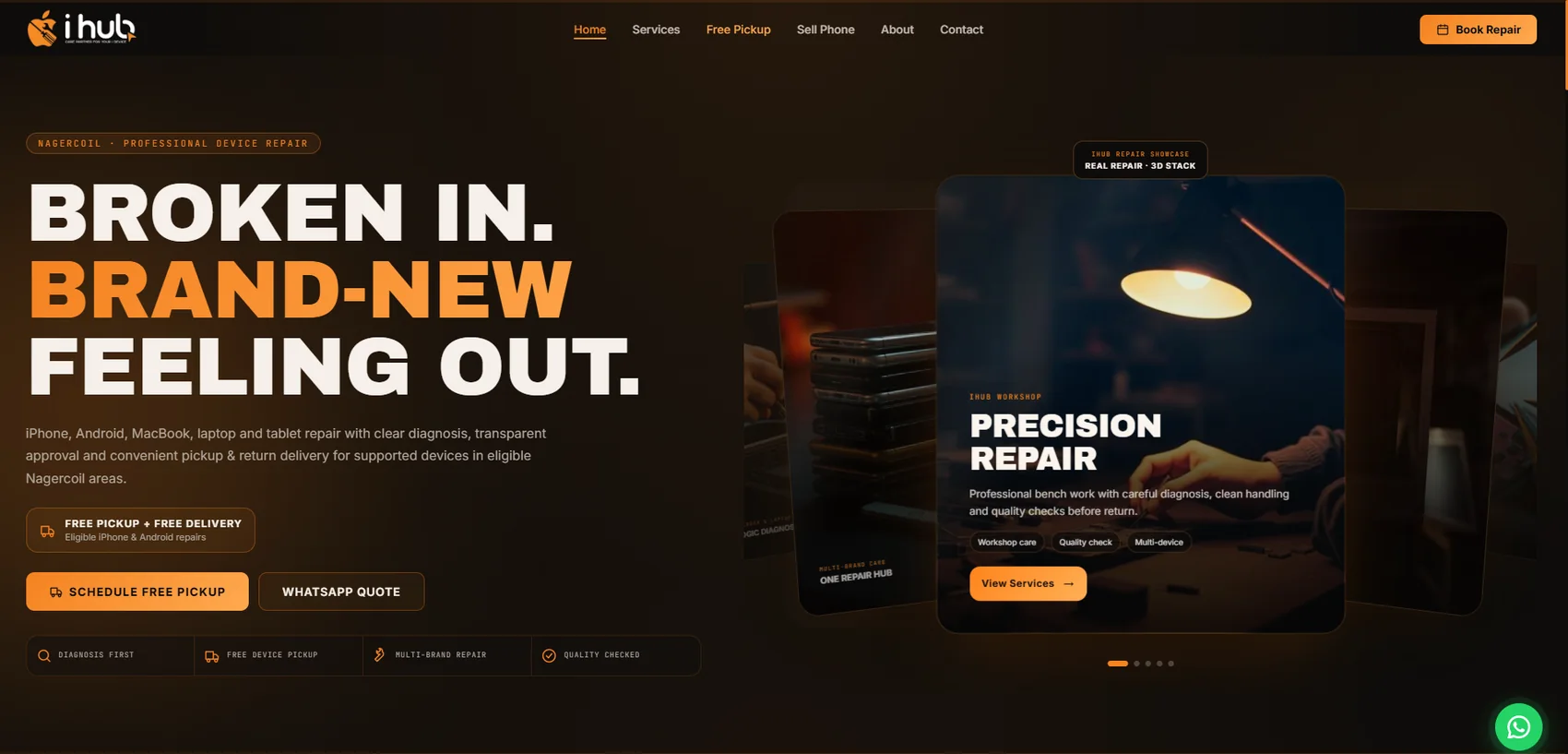
iHub Mobile Repair Shop Website

Completed mobile, iPhone, Android, MacBook, laptop and tablet repair website with premium orange-black branding, free pickup, repair booking and WhatsApp enquiry flow.

Detailed workflow, technical stack and visual structure are presented below for client trust.

Sensitive internal data is converted into safe public portfolio wording.

iHub Mobile Repair Shop Website main project preview
Website + Mobile Repair + Service Business

What this project is about.

iHub Mobile Repair Shop Website is a completed premium service-business website created for a mobile, iPhone, Android, MacBook, laptop and tablet repair brand. The design uses a strong black and orange visual direction, large hero typography, device repair imagery, call-to-action buttons, service sections, pricing flow, about content and contact enquiry support. It is designed to present a professional repair shop identity, build customer trust and guide visitors quickly toward call, WhatsApp and diagnosis enquiries.

Why this system was needed.

Mobile repair customers usually decide quickly based on trust, service clarity and easy contact options. A repair business needs a professional webpage that explains what devices are repaired, highlights experience, shows service confidence, supports quick calls or WhatsApp messages and looks strong on mobile screens. A weak or generic webpage can reduce trust and miss urgent repair enquiries.

How the project solves it.

A modern branded website was prepared with premium orange-black styling, a large repair-focused hero message, iHub identity, navigation menu, call action, service sections, process flow, gallery, why-us content, pricing blocks, testimonials and contact section. The completed React/TanStack Start website is deployed publicly with a responsive, content-rich repair business experience.

Workflow and business use explained clearly.

This workflow is documented from the iHub project structure and the latest completed homepage screenshot. The website is now completed and publicly available through the live project link.

01

Hero Message

Visitors land on a bold hero section that immediately explains the repair business and key value: fixing phones and laptops professionally.

02

Navigation Flow

The header gives quick navigation to services, pricing, about and contact so customers can find repair information without confusion.

03

Fast CTA

Call and enquiry buttons guide urgent customers to take action instead of searching manually for contact details.

04

Service Review

Service sections explain the types of device support offered, including screen, battery, board and laptop-related repairs.

05

Repair Visuals

Gallery and repair visuals help customers understand the workshop style and technical service focus.

06

Pricing Clarity

Pricing or package sections can show common repair categories and help reduce repeated basic enquiry questions.

07

Trust Building

Trust sections such as why-us and testimonials support credibility before the customer contacts the shop.

08

Customer Enquiry

The contact flow converts interested visitors into phone, WhatsApp or diagnosis enquiries for the repair business.

Main modules included in the system.

  • Premium homepage hero with iHub logo, navigation, Nagercoil device-repair positioning, large repair headline, free pickup and strong orange-black branding.
  • Book Repair, Schedule Free Pickup and WhatsApp Quote actions designed for fast customer conversion from urgent repair enquiries.
  • Service overview flow for iPhone, Android, laptop, screen, battery and board-level repair positioning.
  • Brand trust message showing premium device care and same-day service style communication.
  • Responsive navigation structure with Home, Services, Free Pickup, Sell Phone, About and Contact sections.
  • Gallery-ready repair visuals for workshop, screen, board repair and device care presentation.
  • Pricing section structure prepared to explain repair packages or common service ranges clearly.
  • Process section planned for diagnosis, repair approval, genuine parts and handover workflow explanation.
  • Why-us content area prepared for technician trust, warranty, genuine parts and support highlights.
  • Testimonials section prepared to show customer trust and service confidence.
  • Contact and enquiry workflow prepared for phone, WhatsApp and repair diagnosis requests.
  • Live production access connected so visitors can open the completed repair website directly from the Yoonow portfolio.

What was developed and configured technically.

  • TanStack Start project structure prepared with route-based pages and React component organisation.
  • React 19 and TypeScript used for modern component-driven webpage development.
  • Vite build workflow prepared for fast development, preview and production build tasks.
  • Tailwind CSS styling direction used for responsive layout, spacing, colours and UI consistency.
  • Framer Motion dependency available for smooth animations and premium service-page interactions.
  • Lucide icon system available for clean service icons, CTA icons and interface details.
  • Radix UI component dependencies included for scalable accessible UI patterns when required.
  • Reusable site sections such as Hero, Services, Process, Gallery, WhyUs, Pricing, Testimonials, CTA and ContactSection are organised separately.
  • SEO metadata prepared with title, description, author, theme colour and Open Graph content for repair-service search presentation.
  • Responsive layout prepared so the repair shop page can work across desktop, tablet and mobile visitors.
  • Error boundary and not-found page structure included for better production reliability.
  • Public portfolio entry is connected to the completed live deployment while keeping the project presentation responsive and client-ready.

Real interface views and working screens.

Only the most relevant real screenshots are shown here so the portfolio stays clean, focused and easy to review.

Live Project Access

Opens the completed iHub mobile repair website with repair services, free pickup, sell-phone options, booking, contact and WhatsApp enquiry actions.

Visit live website

Why this project builds client confidence.

01

Service Business Focus

Shows Yoonow can design strong branded webpages for service businesses with direct customer enquiry goals.

02

Premium Branding

Uses a premium repair-shop visual style instead of a basic template look, helping the business appear more professional.

03

Enquiry Journey

Connects business content, service explanation, pricing, testimonials and contact flow into one clear customer journey.

04

Live Production

Shows a completed public release with direct booking, pickup, service and contact actions available from the live website.

Do you need a similar service business website like this?

Yoonow Technologies can design a custom service-business webpage with premium branding, service sections, pricing blocks, enquiry buttons, WhatsApp flow, responsive layout and launch-ready content.

Get Quote